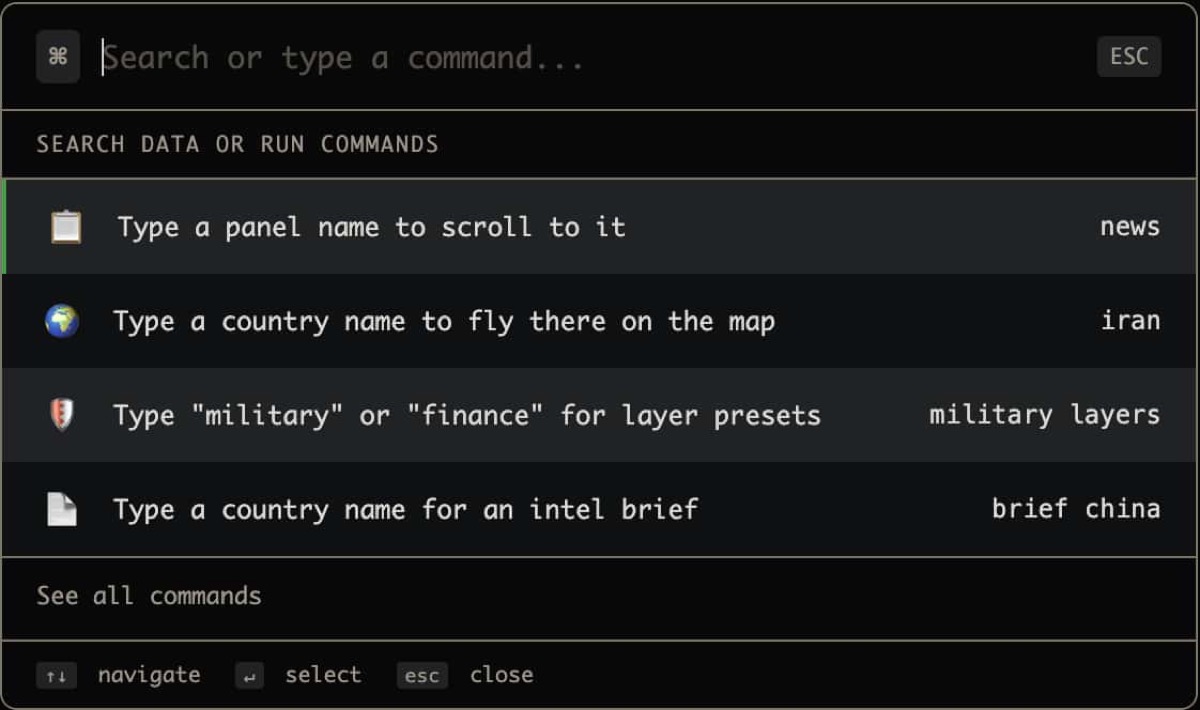
Cmd+K: Search Everything on the Planet in Under a Second
You’re monitoring a developing situation. News breaks about a military incident in the South China Sea. You need Taiwan’s intelligence dossier, the military bases layer, the AIS maritime panel, and the strategic theater posture, right now.
In most dashboards, that’s four separate navigation actions. In World Monitor, it’s one: Cmd+K (or Ctrl+K on Windows/Linux), type what you need, hit Enter. This is one of the key advantages that sets World Monitor apart from traditional intelligence tools.
The 150+ Command Universe
World Monitor’s command palette is a fuzzy-search interface that spans the entire platform. Hit Cmd+K and you can access:
Countries (195)
Type any country name and instantly pull up its full intelligence dossier: CII score, active signals, AI analysis, infrastructure exposure, and 7-day timeline. Country names are searchable in all 21 supported languages, so typing “Allemagne” finds Germany, “Japón” finds Japan.
Navigation (8 regional presets)
Jump to any region: Global, Americas, Europe, MENA, Asia-Pacific, Africa, Oceania, Latin America. The map pans, zooms, and adjusts layer visibility in one action.
Layer Toggles (25+)
Toggle any data layer by name: conflicts, military bases, AIS vessels, flights, undersea cables, pipelines, nuclear facilities, earthquakes, fires, cyber threats, GPS jamming, protests, displacement, datacenters, and more.
Layer Presets
Activate curated layer combinations with a single command:
- Military: Bases, flights, vessels, GPS jamming
- Finance: Exchanges, financial centers, commodity hubs
- Infrastructure: Cables, pipelines, datacenters, ports, nuclear
- Intelligence: Conflicts, hotspots, protests, OSINT
- Minimal: Clean map with no overlays
- All / None: Everything on or everything off
Panel Shortcuts (50+)
Open any panel: news feed, intelligence brief, CII rankings, markets, commodities, crypto, predictions, webcams, world brief, strategic posture, and dozens more.
View Controls
- Dark/light mode toggle
- Fullscreen toggle
- Data refresh
- Time range selection (1h, 6h, 24h, 48h, 7 days)
Fuzzy Search That Actually Works
The command palette uses case-insensitive fuzzy matching with intelligent ranking. You don’t need exact names:
- Type “taiwan” → Shows Taiwan country brief, Taiwan Strait theater, nearby bases
- Type “crypto” → Shows crypto panel, stablecoin monitor, BTC signals
- Type “fire” → Shows NASA FIRMS layer, fire-related news
- Type “base” → Shows military bases layer
- Type “iran” → Shows Iran country brief, Iran theater, Iran-related panels
Results are grouped by category (Navigate, Layers, Panels, View, Actions, Country) so you can scan quickly even when multiple results match.
Multilingual Search
With 21 languages supported, the command palette adapts to your locale. Country names and common commands are searchable in:
English, French, German, Spanish, Italian, Portuguese, Dutch, Swedish, Polish, Czech, Romanian, Bulgarian, Greek, Russian, Turkish, Arabic, Chinese (Simplified), Japanese, Korean, Thai, Vietnamese
An Arabic-speaking analyst can type country names in Arabic and get the same results. A Japanese user can search in kanji. The search indexes include localized keywords for all 195 countries in every supported language.
Recent Searches
The command palette remembers your last 8 searches, displayed at the top when you open it. During fast-moving situations, this means you can rapidly cycle between the same few views without retyping.
Monitoring a crisis across three countries? Your recent searches keep those three country briefs one keypress away.
Keyboard Navigation
The entire palette is keyboard-driven:
- Arrow Up/Down: Navigate results
- Enter: Execute selected command
- Escape: Close palette
- Type: Refine search in real time
No mouse needed. For analysts who live in the keyboard, this means World Monitor’s entire intelligence platform is accessible without touching a pointing device.
Mobile Search Experience
On mobile, the command palette transforms into a touch-optimized search sheet:
- Category chips at the top for quick filtering (Countries, Layers, Panels)
- One-handed keyboard layout optimized for phone use
- Swipe to dismiss
- Large touch targets for result selection
The same 150+ commands and 195 countries are available on mobile, just with a touch-first interface.
Context-Aware Suggestions
The command palette is panel-aware. When you have specific panels open, related commands surface higher in results. If you’re viewing the finance panels, market-related commands rank higher. If you’re in the military view, defense-related layers and theaters appear first.
Power User Workflows
Morning Intelligence Sweep (60 seconds)
- Cmd+K → “world brief” → Enter (AI summary)
- Cmd+K → “cii” → Enter (instability rankings)
- Cmd+K → “hotspot” → Enter (escalation scores)
- Cmd+K → “military” preset → Enter (all military layers)
- Cmd+K → country of interest → Enter (deep dive)
Breaking Event Response (30 seconds)
- Cmd+K → country name → Enter (dossier)
- Cmd+K → “intelligence” preset → Enter (all OSINT layers)
- Cmd+K → “webcam” → Enter (live video)
- Cmd+K → “telegram” → Enter (OSINT channels)
Market Open Preparation (45 seconds)
- Cmd+K → “finance” preset → Enter
- Cmd+K → “macro” → Enter (7-signal radar)
- Cmd+K → “prediction” → Enter (Polymarket)
- Cmd+K → “commodity” → Enter (price panel)
The command palette turns World Monitor from a visual dashboard into a queryable intelligence system. Ask it anything, get there instantly. Explore the five dashboard variants to see how the palette adapts to different operational contexts.
Why It Matters
In intelligence analysis, time to insight is the critical metric. Every second spent navigating menus, scrolling sidebars, or clicking through panels is a second you’re not analyzing.
World Monitor’s Cmd+K reduces the path from question to answer to a single search query. Type what you need, press Enter, and you’re looking at it. For professionals who make time-sensitive decisions based on global intelligence, that speed compounds into a significant advantage.
Frequently Asked Questions
Does the command palette work on mobile devices? Yes. On mobile, Cmd+K transforms into a touch-optimized search sheet with category chips, large touch targets, and swipe-to-dismiss. All 150+ commands and 195 countries remain accessible through a touch-first interface.
Can I search in languages other than English? Absolutely. The command palette indexes country names and keywords in all 21 supported languages. You can type in Arabic, Japanese, Russian, or any other supported language and get accurate results.
How do I customize which commands appear first? The palette is context-aware: it ranks results based on your currently active panels and layers. Your last 8 searches also appear at the top for quick access during fast-moving situations.
Try it now: open worldmonitor.app and press Cmd+K. Your intelligence is one search away.